
There are 123 players online now!
play.mcgamer.net
Gaming Pc Build 500-600
- Thread starter Demshox
- Start date
-
Our Minecraft servers are offline but we will keep this forum online for any community communication. Site permissions for posting could change at a later date but will remain online.

Ninjakid3033
Spectator
- Joined
- Jan 2, 2015
- Messages
- 8
- Reaction score
- 1
I would suggest just looking up youtube videos searching up Gaming PC build, and then your price range. Good luck!

gizmobrick
Experienced
- Joined
- Sep 17, 2012
- Messages
- 305
- Reaction score
- 146
Here is a $600 build I put together a few days ago: http://pcpartpicker.com/user/HackInBuild/saved/KpvmP6
Coming from a 20FPS laptop, this will seem like an absolute beast. That said, you will still need to get an operating system as well as a display, keyboard, and mouse for it to be usable. Feel free to PM me with any further questions about this build.
Coming from a 20FPS laptop, this will seem like an absolute beast. That said, you will still need to get an operating system as well as a display, keyboard, and mouse for it to be usable. Feel free to PM me with any further questions about this build.

Demshox
Tribute
- Joined
- Mar 15, 2014
- Messages
- 44
- Reaction score
- 1
thanks, how much fps does it usually getHere is a $600 build I put together a few days ago: http://pcpartpicker.com/user/HackInBuild/saved/KpvmP6
Coming from a 20FPS laptop, this will seem like an absolute beast. That said, you will still need to get an operating system as well as a display, keyboard, and mouse for it to be usable. Feel free to PM me with any further questions about this build.
gizmobrick
Experienced
- Joined
- Sep 17, 2012
- Messages
- 305
- Reaction score
- 146
With medium-high settings (12 chuck render distance, fancy graphics, smooth lighting 100%, mipmap 4) AND Optifine installed, you should be looking at well over 60FPS.thanks, how much fps does it usually get

SubjectBlue
Diamond
- Joined
- Apr 22, 2014
- Messages
- 126
- Reaction score
- 112
what about on really low settings?With medium-high settings (12 chuck render distance, fancy graphics, smooth lighting 100%, mipmap 4) AND Optifine installed, you should be looking at well over 60FPS.

ArgaJones
Peacekeeper
- Joined
- Apr 28, 2014
- Messages
- 1,055
- Reaction score
- 683
Over 100fpswhat about on really low settings?


_SWF
Survivor
- Joined
- Dec 15, 2013
- Messages
- 134
- Reaction score
- 35
While I do agree with Imanol that you should save your money to get more quality parts, you necessarily don't have to if you're willing to 'frequently' (once every 3-5 months) upgrade your parts along the way.
Anyways, I do believe that this PC should suffice.
http://pcpartpicker.com/p/zHmsWZ
The linked parts are carefully chosen.
-The i5 4440, an amazing quad-core processor is great for light-medium load video editing/rendering, gaming, and other miscellaneous task. I had an i5 4590 and it handled MineCraft, CSGO, DayZ, Arma, Assassin's Creed, etc. easily.
-The motherboard is a low-mid end motherboard. The reason for this motherboard is because Asrock has an extremely low fail rate when compared to other motherboard companies such as MSI, Gigabyte, Asus, etc.
You can get a cheaper motherboard, but I'm going to warn you. Cheaper parts usually implies cheaper build quality.
-The RAM. Standard 2x4 1600Mhz kit of RAM. It comes with a blue heat spreader, but I'm sure you can find other color variants on Amazon or Newegg if you don't like the color.
-Now, the hard drive. Since this is going to be a primarily gaming oriented PC, I assumed that you are going to have a load of games installed at once. 1 TB is more than enough to hold a large amount of games at once. (It's reliable too, so don't worry about your hard drive failing on you) I played plenty of games as well as recorded them with a 1 TB HDD and I can assure you that you will most likely not fill up the entire HDD.
-The GPU is what makes a gaming PC a gaming PC. This card can handle plenty of games. While it may not give you the ability to max out every game, it will at least give you steady FPS at medium settings. (Games like CS:GO, MineCraft, etc. can be easily maxed out) I had a similar GPU, the r7 260x, and I was able to play all the games I owned at medium settings.
-Just a standard case! You can search around for other cases if you don't like the case.
-Lastly, the PSU. While it may not be Bronze certified, it is reliable. My PC uses the same PSU, and I have encountered no problems so far. 500w is more than enough to power all of your parts. (This PC uses 323w @ max load) Because of the large amount of leeway, feel free to test out overclocking that GPU if it doesn't perform up to your expectations. (Be warned, overclocking the GPU might cause instability.)
Also, here are some notes you might want to know.
-This does NOT come with peripherals. You will need to have your own monitor, keyboard, mouse, OS, etc.
-In addition, it does not come with an optical drive. If you're installing Windows from a CD, I suggest purchasing a cheap optical drive from Amazon or Newegg. Otherwise, just use Ubuntu until you can create a bootable Windows USB stick.
-Last but not least, I want you to disregard any rumors of people saying "building a PC is hard". Building a PC is one of the most simple tasks an average person can do. A YouTube video by JayzTwoCents shows his 5 year old daughter building a PC. While she did need help here and there, she was still able to do the majority of the work by herself.
Good luck!
This took so long to write ;-;
Because my main PC broke, I'm using this 2000s Dell Laptop.
It took me 5 minutes to open up Internet Explorer. Help meeee. ;----;
Anyways, I do believe that this PC should suffice.
http://pcpartpicker.com/p/zHmsWZ
The linked parts are carefully chosen.
-The i5 4440, an amazing quad-core processor is great for light-medium load video editing/rendering, gaming, and other miscellaneous task. I had an i5 4590 and it handled MineCraft, CSGO, DayZ, Arma, Assassin's Creed, etc. easily.
-The motherboard is a low-mid end motherboard. The reason for this motherboard is because Asrock has an extremely low fail rate when compared to other motherboard companies such as MSI, Gigabyte, Asus, etc.
You can get a cheaper motherboard, but I'm going to warn you. Cheaper parts usually implies cheaper build quality.
-The RAM. Standard 2x4 1600Mhz kit of RAM. It comes with a blue heat spreader, but I'm sure you can find other color variants on Amazon or Newegg if you don't like the color.
-Now, the hard drive. Since this is going to be a primarily gaming oriented PC, I assumed that you are going to have a load of games installed at once. 1 TB is more than enough to hold a large amount of games at once. (It's reliable too, so don't worry about your hard drive failing on you) I played plenty of games as well as recorded them with a 1 TB HDD and I can assure you that you will most likely not fill up the entire HDD.
-The GPU is what makes a gaming PC a gaming PC. This card can handle plenty of games. While it may not give you the ability to max out every game, it will at least give you steady FPS at medium settings. (Games like CS:GO, MineCraft, etc. can be easily maxed out) I had a similar GPU, the r7 260x, and I was able to play all the games I owned at medium settings.
-Just a standard case! You can search around for other cases if you don't like the case.
-Lastly, the PSU. While it may not be Bronze certified, it is reliable. My PC uses the same PSU, and I have encountered no problems so far. 500w is more than enough to power all of your parts. (This PC uses 323w @ max load) Because of the large amount of leeway, feel free to test out overclocking that GPU if it doesn't perform up to your expectations. (Be warned, overclocking the GPU might cause instability.)
Also, here are some notes you might want to know.
-This does NOT come with peripherals. You will need to have your own monitor, keyboard, mouse, OS, etc.
-In addition, it does not come with an optical drive. If you're installing Windows from a CD, I suggest purchasing a cheap optical drive from Amazon or Newegg. Otherwise, just use Ubuntu until you can create a bootable Windows USB stick.
-Last but not least, I want you to disregard any rumors of people saying "building a PC is hard". Building a PC is one of the most simple tasks an average person can do. A YouTube video by JayzTwoCents shows his 5 year old daughter building a PC. While she did need help here and there, she was still able to do the majority of the work by herself.
Good luck!
This took so long to write ;-;
Because my main PC broke, I'm using this 2000s Dell Laptop.
It took me 5 minutes to open up Internet Explorer. Help meeee. ;----;
Last edited:
SubjectBlue
Diamond
- Joined
- Apr 22, 2014
- Messages
- 126
- Reaction score
- 112
Nah I have a pc build that can get 200 fps while recording and 600 on high settings. Its like 660 - 700 $ I believe.

Mooclan
Forum God
- Joined
- Aug 19, 2012
- Messages
- 6,357
- Reaction score
- 12,658
Here you go. Built for just barely under $500. Prices may change.
Keep in mind that I was accidentally given 16 GBs of RAM instead of the 8 that I ordered. However, I don't allocate the full 8 to Minecraft - I sometimes use 6 GBs, and sometimes use 1 GB. It doesn't seem to make a difference for me.
Keep in mind that I was accidentally given 16 GBs of RAM instead of the 8 that I ordered. However, I don't allocate the full 8 to Minecraft - I sometimes use 6 GBs, and sometimes use 1 GB. It doesn't seem to make a difference for me.
Well, my PC is custom-built, but can run Shaders in UHC at 150+ FPS on medium settings and render distance.
This post was copied and pasted from another thread, but the information in it should still be relevant.
Alrighty, here we go...
Performance on Minecraft using a $500 custom-built computer:
SEUS V10 Standard Shaders, 6 chunks, Medium settings, Fancy graphics - 80-200 FPS. Usually around 110, and can RECORD using Fraps, Dxtory, or OBS at 60+.
Minimum settings, 2 chunks, no Shaders - 500+ FPS, can fluctuate between 250 and 700.
Even though this is a relatively low-price computer, it gets amazing performance. I can run League of Legends at max settings at 60+ FPS, CS:GO at default settings at 120+.
http://prntscr.com/5irupy
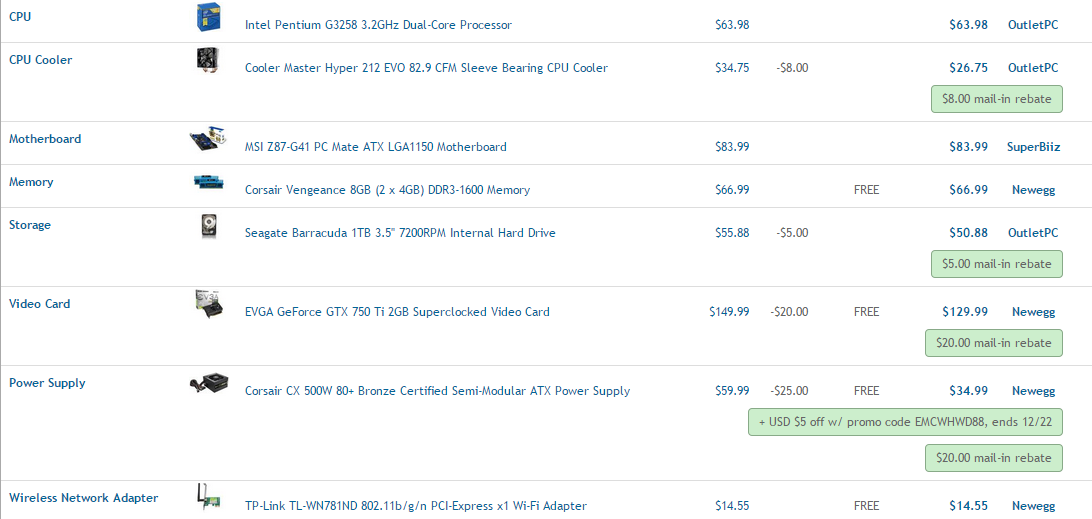
This was what went inside of my $500 computer.
Within the parts list, I did not include:
Mouse
Monitor
Keyboard
Headphones or other audio devices
Case/Tower
I already had all of these parts. The monitor is 1920 x 1080.
My computer was slightly LESS than $500, and you can currently purchase these parts for about $472 USD if you use the PCPartPicker List: https://pcpartpicker.com/user/Mooclan/saved/nTcBD3
(The price is subject to change as parts go up and down in price)
The thing about my computer is that I ordered 8 GBs of RAM, but Amazon gave me 16 by accident. I am therefore able to dedicate 6 or even 8 GBs of RAM to Minecraft and still have plenty left over.
Keep this in mind:

Basically, what this means is that if you buy the motherboard that I have listed, there is a small chance of you receiving one that needs an update in order to be compatible with the Processor... that gets complicated. As long as you purchase from a reputable vendor such as Newegg or Amazon, you should be fine.
Anyways, if you want to read further, here you go:
http://www.minecraftsurvivalgames.com/threads/pc-help-forgot-where-to-post-t-xd.149167/#post-1629114
https://pcpartpicker.com/user/Mooclan/saved/nTcBD3
Intel Pentium G3258 3.2GHz Dual-Core Processor - $69.99
The processor, while it looks rather low-powered at first glance, has amazing overclocking performance. Using a good cooler, you can hit easily 4.5 GHz, some say even up to 4.8.
When this processor was released, there was massive hype about it due to its overclocking abilities.
Keep in mind that it's only dual-core, and if you aren't going to be overclocking it then it's only 3.2 GHz.
(Note: I'm not overclocking it, and still getting great FPS in Minecraft, League, and CS:GO on good settings)
Cooler Master Hyper 212 EVO 82.9 CFM Sleeve Bearing CPU Cooler - $34.98
A friend of mine bought this cooler and stuck it on his CPU, on his 2.7k computer with 28 USB ports and 8.75 TBs of storage. Apparently, it's cheap enough that it can fit into a $500 build as well.
Due to an issue with shipping and payment, I decided not to get this. I may purchase it separately on Black Friday or something.
I'm currently using the fan that came with the CPU, and it works absolutely fine.
If you're on a tight budget, it's fine to get a cheaper fan, or to just not get one at all.
MSI Z87-G41 PC Mate ATX LGA1150 Motherboard - $91.97
From what I've read, the Z87 is a good motherboard, and it has a really sweet-looking BIOS, plus the color scheme is blue and black, two colors which I tend to favor.
For some reason, I read somewhere that the Z87 only supports up to DDR3-1333 RAM, but don't believe that - My 1600 RAM works just fine on it on the BIOS.
There is, however, one risk to buying this motherboard - You may need to update the BIOS before putting it with the CPU that I listed. Mine didn't need it, but I heard that there are some Z87's on the loose that do. As long as you buy from a reputable source, you should be good to go. (I got my parts primarily from Amazon and Newegg)
If you want a step up from this motherboard, which I doubt since you're on a budget, perhaps consider the Z97. I don't really know much about it.
Corsair Vengeance 8GB (2 x 4GB) DDR3-1600 Memory - $75.99
Aside from looking absolutely fabulous, the RAM seems to work well.
When I received my order, I was delighted to find that they had accidentally shipped me a package of 16 GBs of the same type of RAM (2x8), but you probably won't get the same thing since it was just by chance.
I've heard that RAM doesn't affect Minecraft performance much, and it's common knowledge that 8 GBs is completely fine for most games on a budget build.
If you think you'll be increasing to 16GBs of RAM some time soon, then perhaps you might consider getting (1x8) RAM, rather than (2x4).
Seagate Barracuda 1TB 3.5" 7200RPM Internal Hard Drive - $58.67
For some reason this one wouldn't ship, so I had to order a 750 GB instead, but I have an old 320 GB Hard Drive that I was able to use as well.
Fairly self-explanatory. It's cheaper than some other brands, but a good speed, reliability, and capacity. All-in-all, a decent hard drive and more than sufficient for gaming, and even recording if you want to.
If you don't have a big enough budget, getting a 500GB or 750GB hard drive can work out too, personally I'd say go for the 750.
EVGA GeForce GTX 750 Ti 2GB Superclocked Video Card - $144.99
In addition to looking quite sleek, it currently has a promotional offer of $150 in-game credit split between three games - Strife, Infinite Crisis, and War Thunder.
It works well, supports up to... what, three? four? monitors, and seems to be a good budget graphics card from what I've seen.
If you don't have that much room in your budget, getting a slightly cheaper graphics card should work too, but I'm not 100% sure on that - you should consult someone more experienced, and read some reviews.
Also, I'm able to play League at 1080p on highest settings and still get at least 60 FPS. When recording/streaming, if I just switch to medium-high settings I can still get 60 FPS.
When livestreaming or recording with Shaders, I can still get 80+ FPS on 4 chunks, and when I first bought the computer I was getting 130-150. Feel free to play around with the settings as you choose.
Corsair CX 500W 80+ Bronze Certified Semi-Modular ATX Power Supply - $64.99
A competent power supply, I think it's also modular (is that the word?) and you can choose which cords to have plugged in, so that you can put in the cords that you want and leave unnecessary cables out.
It's 80+/Bronze. And while I have absolutely no idea what that means, I heard that it's something good for a budget build. I know that it works perfectly fine for me, and since it's 500W it is plenty for what I have listed here... I think.
The power supply is not something that you want to cheap out on, since its... y'know, the power supply.
TP-Link TL-WN781ND 802.11b/g/n PCI-Express x1 Wi-Fi Adapter - $14.98
A fairly good WiFi adapter. I was able to get over 10 MB upload on it, but about 20 MB download (using speedtest.net). Using an Ethernet cord, I can get 11 MB Upload, and 50-60 download. My computer is stationed about 10-15 feet away from my WiFi router, and there was almost no change in ping between using an Ethernet cord and WiFi on this adapter.
Ethernet Cord: (The ethernet cord is a bit excessively long and slightly damaged on one end)
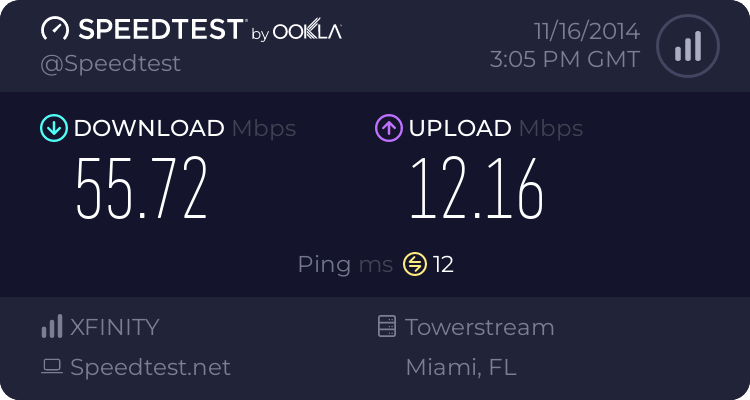
Using the WiFi adapter: (There's a table and a few boxes with the computer packaging and boxes in between the router and the computer)

I had issues finding the Ethernet port on my motherboard, because there was a metal thingy sticking out over it that I had to bend back in order to plug the Ethernet cord in. You may or may not encounter the same issue, but if you do... it's there, you just gotta get good lighting and look for it, and then bend a small metal thing out of the way.
**I'm not a computer expert**
Latest threads
-
 From my point of view: The whole thing
- Started by GeckoGoggals
-
MCGamer Documentary
- Started by MeaganRoses
-
 MCSG - Final Goodbye Event
- Started by Alyssa
-
When is the shut down date?
- Started by Melancon2

