How to put a screenshot for your signature?

  • Our Minecraft servers are offline but we will keep this forum online for any community communication. Site permissions for posting could change at a later date but will remain online.

Status
Not open for further replies.

Dovgan2000

Survivor
Joined
Mar 25, 2014
Messages
212
Reaction score
72
So, I have this screenshot I took, where I killed TOXICWASTEII, and I would like to put it as my signature, how can I do that?
 

Zacharoutio

Moderator | Mapping Team
Joined
Apr 10, 2014
Messages
791
Reaction score
934
This is your best way.
Upload your wanted screenshot to imgur. -> https://imgur.com/
- Click the "Computer" button on the top right hand corner.
- Find the screenshot in your computer
- Then hit "Start Upload"

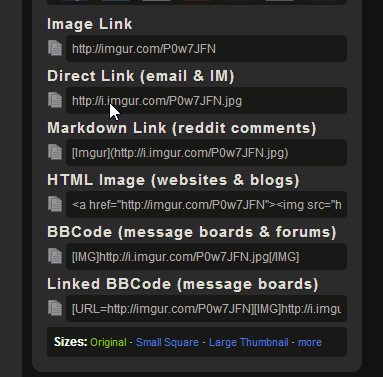
When it is finished you should see this in the right.


Copy and paste the BBCode text and simply put it in your signature, then your are done.

If you need any further help, shoot me a PM and I can help.

QA;TL.
 
Status
Not open for further replies.

Members online

No members online now.

Forum statistics

Threads
242,188
Messages
2,449,241
Members
523,962
Latest member
Atasci